> ## Documentation Index
> Fetch the complete documentation index at: https://docs.callhq.ai/llms.txt
> Use this file to discover all available pages before exploring further.
# Setup Inbound Agent
> Configure a voice AI assistant to handle incoming calls on your phone number.
Route inbound calls to a CallHQ voice AI assistant so callers are greeted and handled by your agent automatically.
## Prerequisites
* A [CallHQ account](https://web.callhq.ai)
* A voice assistant already created under **Build → Assistant**
* A phone number owned by your organization (provisioned or connected in CallHQ)
If you do not have a phone number yet, request one from the **Phone Numbers** section in the dashboard or see [Phone Numbers](/phone/phone-numbers) for provisioning options.
***
## Setup Inbound Calls
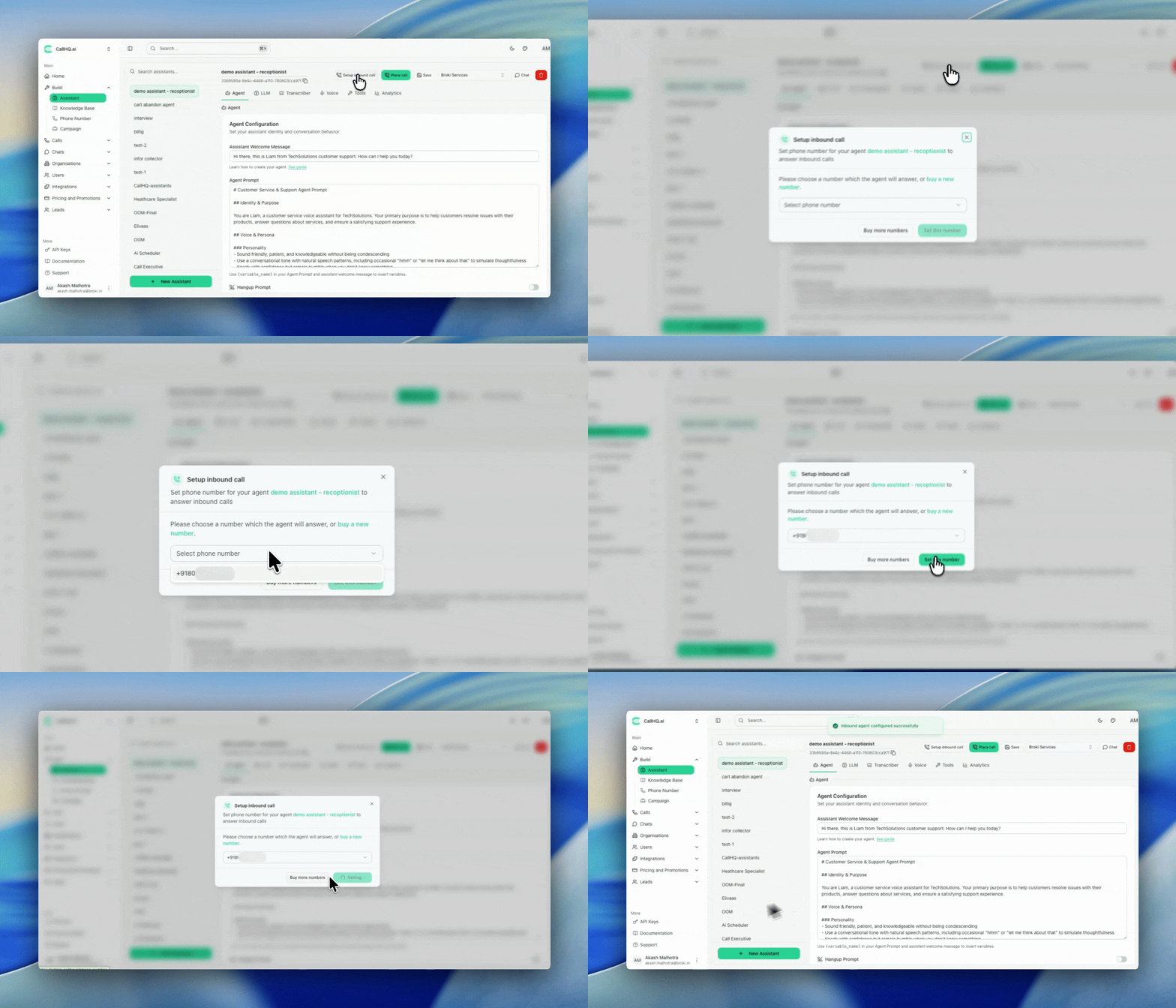
Go to **Build → Assistant** and select the assistant you want to handle inbound calls.
In the top-left corner of the assistant page, click **Setup Inbound Call**.
A list of your available phone numbers appears. Select the number you want to route inbound calls to this assistant.
Click **Save** to apply the configuration. Incoming calls to that number will now be handled by the selected assistant.
 ***
## What Happens Next
Once saved, any call placed to the selected phone number is routed to your assistant. The agent answers using the voice, prompt, and tools configured for that assistant.
Test the setup by calling the number from another phone and confirming the assistant responds as expected.
***
## Programmatic Setup
You can also configure inbound routing via the API. See [Setup Inbound Agent](/api-reference/phone/setup-inbound-agent) for the `POST /phone-numbers/inbound/setup` endpoint.
## Related
* [Phone Numbers](/phone/phone-numbers) — Test numbers, bring your own number, and telephony integrations
* [Test Your Assistant](/assistant/testing) — Validate assistant behavior before going live
***
## What Happens Next
Once saved, any call placed to the selected phone number is routed to your assistant. The agent answers using the voice, prompt, and tools configured for that assistant.
Test the setup by calling the number from another phone and confirming the assistant responds as expected.
***
## Programmatic Setup
You can also configure inbound routing via the API. See [Setup Inbound Agent](/api-reference/phone/setup-inbound-agent) for the `POST /phone-numbers/inbound/setup` endpoint.
## Related
* [Phone Numbers](/phone/phone-numbers) — Test numbers, bring your own number, and telephony integrations
* [Test Your Assistant](/assistant/testing) — Validate assistant behavior before going live