> ## Documentation Index
> Fetch the complete documentation index at: https://docs.callhq.ai/llms.txt
> Use this file to discover all available pages before exploring further.
# Knowledge Base
> Learn how to create and integrate custom knowledge bases into your CallHQ voice AI assistants.
Enhance your CallHQ voice AI assistants with custom knowledge bases that contain your specific domain information. By attaching relevant files to your assistant, you can significantly improve response accuracy and provide users with detailed, up-to-date information from your own data sources.
## What is a Knowledge Base in CallHQ?
A **Knowledge Base** is a collection of custom files containing specialized information on specific topics, domains, or business processes. When integrated with your CallHQ voice AI assistant, it enables the system to access and reference your proprietary data, delivering more accurate and contextually relevant responses to user inquiries.
### Benefits of Using Knowledge Bases
Integrating a Knowledge Base with your CallHQ assistant provides several key advantages:
* **Enhanced Accuracy**: Your assistant can provide responses based on your verified, up-to-date information rather than relying solely on general knowledge.
* **Domain Expertise**: Enable your assistant to handle complex, industry-specific queries with detailed, authoritative responses.
* **Customization**: Tailor your assistant's knowledge to specific business domains, products, or services for maximum effectiveness.
* **Information Control**: Maintain full control over the content your assistant references, ensuring consistency with your business standards.
* **Real-time Updates**: Keep your assistant current by regularly updating the knowledge base files.
Knowledge Bases are configured through the CallHQ dashboard or API. For advanced configuration options, view all configurable properties in the [API Reference](/api-reference/knowledge-bases/using-query-tool).
## Creating a Knowledge Base
CallHQ offers two approaches to creating and integrating Knowledge Bases:
1. **Dashboard Method**: A streamlined approach using the CallHQ user interface
2. **API Method**: A more flexible approach using direct API integration
### Method 1: Using the CallHQ Dashboard
#### Step 1: Upload Your Files
1. Navigate to `Build → Knowledge Base` in your CallHQ dashboard
2. Click the "Upload" button to add your knowledge base files
3. Select files in supported formats (`.txt`, `.pdf`, `.docx`, etc.)
4. Wait for the upload to complete - your files will appear in the Files section
CallHQ supports various file formats for Knowledge Bases including: .txt, .pdf, .docx, .doc, .csv, .md, .tsv, .yaml, .json, .xml, and .log files.
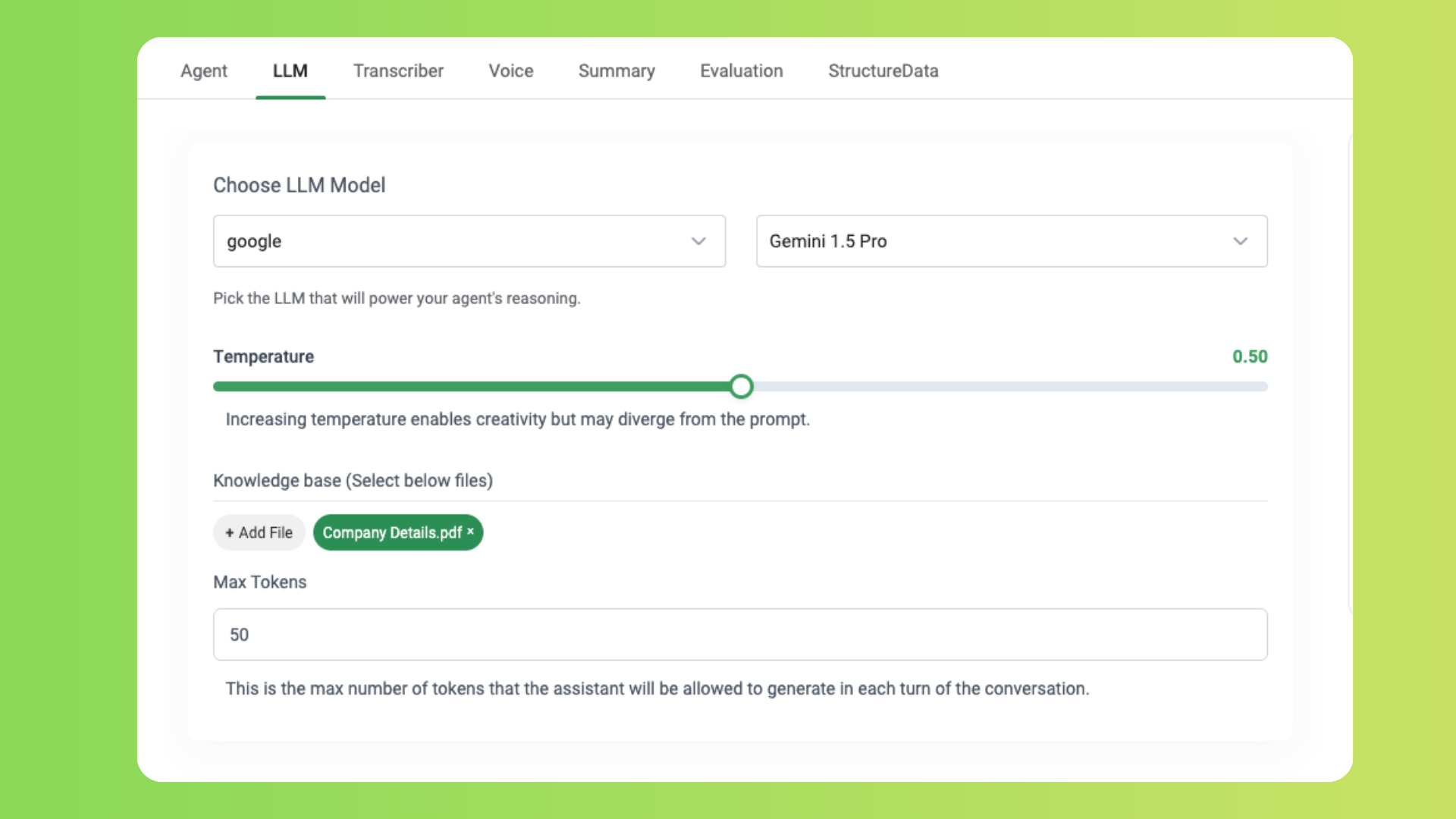
#### Step 2: Configure Your Assistant with the Knowledge Base
1. Navigate to `Build → Assistant`
2. Select the assistant you want to enhance with the Knowledge Base
3. In the assistant configuration, goto llm section. At the bottom you will see the availble files.
4. Select the files you uploaded in Step 1 to associate them with this assistant
#### Step 3: Publish the Assistant
1. Configure your assistant to utilize the knowledge base effectively by adding appropriate prompts in your assistant's configuration. This ensures the assistant knows when to reference the knowledge base versus using its general knowledge.
For example, if you have a knowledge base about your company's products, you might add this prompt:
```
When users ask about our products, services, or company information, use the knowledge base to provide accurate details.
```
2. Review your assistant configuration to ensure all settings are correct
3. Click the "Publish" button to make your changes live
4. This automatically creates a default knowledge base (using the query tool) with the selected files for the assistant
When you publish an assistant with selected files, CallHQ automatically creates
a query tool with those files configured as a knowledge base. For more
advanced configurations, use the API method described below.
### Method 2: Using the API
For more advanced configurations, you can create and configure Knowledge Bases using the API through the Query Tool. This method offers greater flexibility and control over your knowledge base setup.
For detailed instructions on creating and configuring knowledge bases via the
API.
The API method enables you to:
* Upload files and obtain file IDs
* Create custom query tools with specific knowledge base configurations
* Configure multiple knowledge bases within a single query tool
* Attach query tools to your assistants
* Set advanced parameters for knowledge retrieval
This approach is recommended for developers and users who need precise control over their knowledge base implementation or are integrating CallHQ into existing systems programmatically.
## Best Practices for Effective Knowledge Bases
* **Optimize file size**: Keep individual files smaller than 300KB to ensure quick processing and response times.
* **Structure content logically**: Organize your files by topic or category with clear headings and sections.
* **Use clear and concise language**: Write in plain language with well-defined terminology to improve retrieval accuracy.
* **Update regularly**: Refresh your knowledge base files whenever information changes to maintain accuracy.
* **Test thoroughly**: After configuration, test your assistant with various queries to ensure it retrieves information correctly.
* **Provide context**: Include sufficient background information in your files to enable comprehensive responses.
* **Consider file formats**: While plain text works well, structured formats can improve information retrieval for complex topics.
For more information on creating effective Knowledge Bases, check out our
tutorial on [Best Practices for Knowledge Base
Creation](https://www.youtube.com/watch?v=5_43UTeHy8g).
By following these guidelines, you can create a comprehensive Knowledge Base that enhances the capabilities of your CallHQ voice AI assistant and provides valuable information to users.
Currently, CallHQ's Knowledge Base functionality supports Google as a provider
with the gemini-1.5-flash model for knowledge retrieval. For the most
up-to-date information on supported providers and models, please refer to our
[API documentation](/api-reference/).
 #### Step 2: Configure Your Assistant with the Knowledge Base
1. Navigate to `Build → Assistant`
2. Select the assistant you want to enhance with the Knowledge Base
3. In the assistant configuration, goto llm section. At the bottom you will see the availble files.
4. Select the files you uploaded in Step 1 to associate them with this assistant
#### Step 2: Configure Your Assistant with the Knowledge Base
1. Navigate to `Build → Assistant`
2. Select the assistant you want to enhance with the Knowledge Base
3. In the assistant configuration, goto llm section. At the bottom you will see the availble files.
4. Select the files you uploaded in Step 1 to associate them with this assistant
 #### Step 3: Publish the Assistant
1. Configure your assistant to utilize the knowledge base effectively by adding appropriate prompts in your assistant's configuration. This ensures the assistant knows when to reference the knowledge base versus using its general knowledge.
For example, if you have a knowledge base about your company's products, you might add this prompt:
```
When users ask about our products, services, or company information, use the knowledge base to provide accurate details.
```
2. Review your assistant configuration to ensure all settings are correct
3. Click the "Publish" button to make your changes live
4. This automatically creates a default knowledge base (using the query tool) with the selected files for the assistant
#### Step 3: Publish the Assistant
1. Configure your assistant to utilize the knowledge base effectively by adding appropriate prompts in your assistant's configuration. This ensures the assistant knows when to reference the knowledge base versus using its general knowledge.
For example, if you have a knowledge base about your company's products, you might add this prompt:
```
When users ask about our products, services, or company information, use the knowledge base to provide accurate details.
```
2. Review your assistant configuration to ensure all settings are correct
3. Click the "Publish" button to make your changes live
4. This automatically creates a default knowledge base (using the query tool) with the selected files for the assistant