> ## Documentation Index
> Fetch the complete documentation index at: https://docs.callhq.ai/llms.txt
> Use this file to discover all available pages before exploring further.
# Introduction
> Overview and authentication guide for accessing CallHQ Voice AI APIs
# CallHQ API Documentation
> Integrate and leverage CallHQ Voice AI through secure HTTP APIs to build real-time conversational voice agents in your applications and workflows.
CallHQ APIs are built with simplicity, consistency, and flexibility in mind. They use resource-oriented URLs, accept `application/json` request bodies, return responses in JSON format, and rely on standard HTTP status codes, verbs, and authentication methods.
You must have a valid CallHQ account to access and use API keys.
## Authentication & API Key Generation
To authenticate with the CallHQ API, follow these steps:
1. Log in to your dashboard at [https://web.callhq.ai](https://web.callhq.ai)
2. Navigate to the **API Keys** section from the left-hand sidebar under **Build**
3. Click the **Generate Key** button to create a new API key
4. Save your API key securely for future use
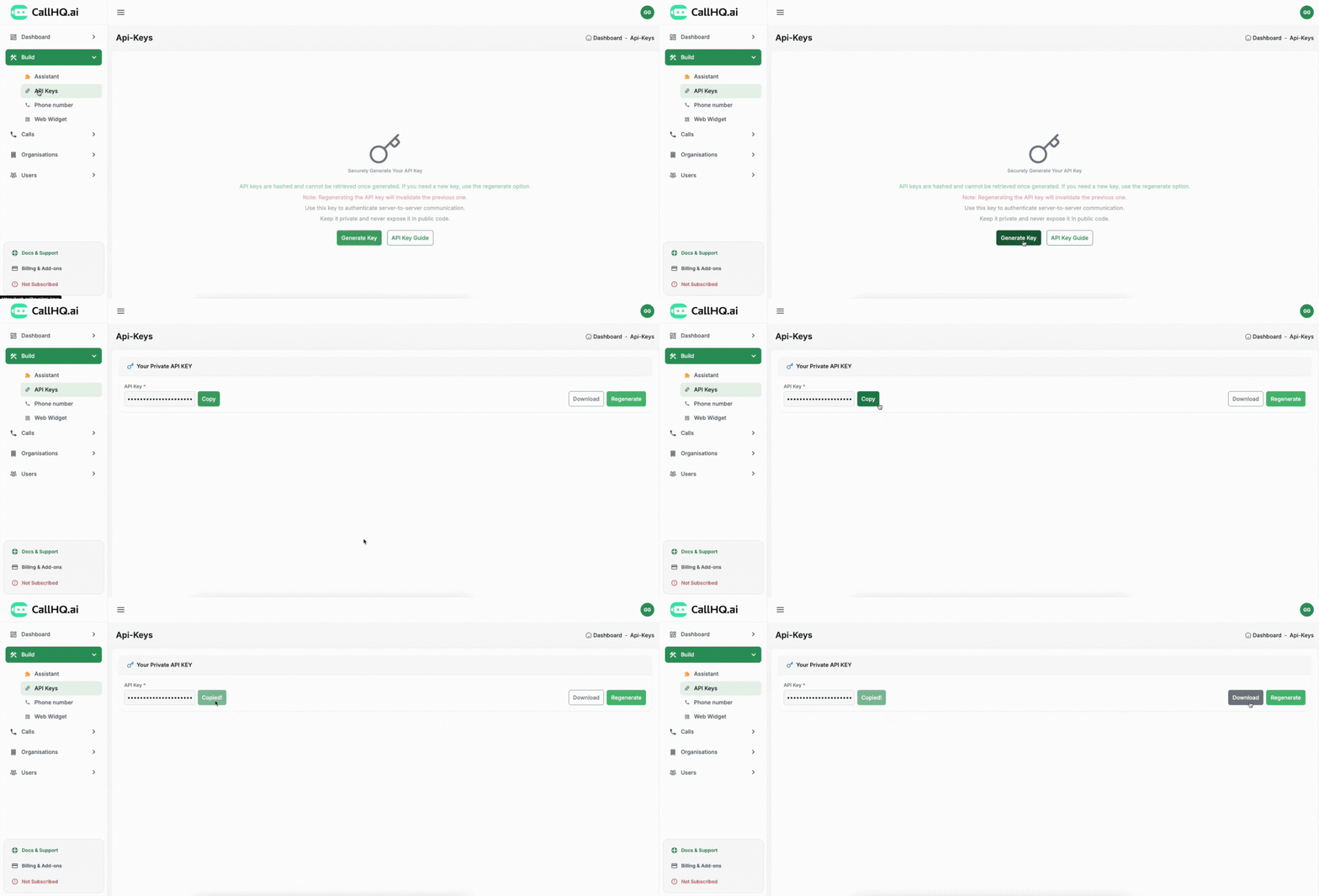 The API key will be shown only once. Please store it securely, as it cannot be retrieved again once lost.
### Important Notes About API Keys
* **API keys are hashed and cannot be retrieved once generated.** If you need a new key, use the regenerate option.
* **Note: Regenerating the API key will invalidate the previous one.**
* **Use this key to authenticate server-to-server communication.**
* **Keep it private and never expose it in public code.**
## Using the API Key
Include the API key in the `x-api-key` header of your HTTP requests.
### Header Format
```
x-api-key:
```
## Example: Authenticated Request
Below is an example of how to make an authenticated GET request to retrieve all voice assistants associated with your account:
```
GET https://api.callhq.ai/assistants/all
Headers:
x-api-key:
```
This will return a list of assistants created under your organization, along with their metadata.
## Next Steps
You're now ready to start building. Explore the following sections to:
* Create your first voice assistant
* Manage call flows using Workflows
* Monitor usage and performance
* Integrate CallHQ with your own systems
Use the navigation pane or quickstart links below to proceed.
The API key will be shown only once. Please store it securely, as it cannot be retrieved again once lost.
### Important Notes About API Keys
* **API keys are hashed and cannot be retrieved once generated.** If you need a new key, use the regenerate option.
* **Note: Regenerating the API key will invalidate the previous one.**
* **Use this key to authenticate server-to-server communication.**
* **Keep it private and never expose it in public code.**
## Using the API Key
Include the API key in the `x-api-key` header of your HTTP requests.
### Header Format
```
x-api-key:
```
## Example: Authenticated Request
Below is an example of how to make an authenticated GET request to retrieve all voice assistants associated with your account:
```
GET https://api.callhq.ai/assistants/all
Headers:
x-api-key:
```
This will return a list of assistants created under your organization, along with their metadata.
## Next Steps
You're now ready to start building. Explore the following sections to:
* Create your first voice assistant
* Manage call flows using Workflows
* Monitor usage and performance
* Integrate CallHQ with your own systems
Use the navigation pane or quickstart links below to proceed.